How YellowNotes works, and why it works that way. For the bigger picture, see About Us.
1. YellowNotes AI
Merging human judgement into AI
What makes the AI responses unique?
Unlike generic AI models that pull from unverified web data, our AI chats pulls directly with human-curated notes so answers are grounded in judgment trusted by you.
How do I control the AI's source of truth?
You choose the exact curators and topics you subscribe to, letting you dictate whose knowledge and perspective inform your AI conversations.
Is the AI model locked into a single provider?
The platform is completely LLM-agnostic, giving content creators total freedom to pick their preferred AI models and custom system prompts.
Yes, yellowNotes are private by default. They either have to be assigned to a topic that has subscribers to be seen by others. Or you send someone a direct link to the note.
How do I organize my notes?
YellowNotes can be tagged and organized into topics that you can revisit later — useful for tasks, saved links, brainstorms, or sketched plans. All notes are searchable across your collection.
How do I point someone to a specific passage?
Put a YellowNote on the sentence that matters and send its link. When the recipient opens it, they land on that spot on the page, with the key passage highlighted.
Do I need the browser extension?
No, not really. The browser extension is the primary tool for content curation, creating YellowNotes. The plugin makes creating YellowNotes, tagging content, more seamless than doing it in the web application. But it is a tool of convenience rather than requirement. You can curate content just as well without it.
However, for pinpoint note placement. Placing a yellowNote on an exact spot on someone else's web page requires the YellowNotes browser extension, which overlays notes onto the original site as you browse it. See Browser Support for which browsers can run it.
Does a note change the website it's attached to?
No. Notes are stored on YellowNotes' own infrastructure and drawn on top of the page by the extension. The host site's code is never touched or altered, and the site owner does not need to permit or install anything. Nor necessarily even be aware of YellowNotes
What happens to a note if the web page changes?
A YellowNote not tied to any specific text will remain in the assigned position regardless of any changes.
If the note is tied to a selected piece of text and that text disappears from the page, the note is still shown. But in the previous location. The selected text will still be shown.
5. Topics and AI Chat
What is a topic?
A topic is a collection of notes on one subject, maintained by a curator — someone who knows the subject well. As the curator finds relevant material on the web, they put a YellowNote on it, and the note becomes part of the topic.
Subscribers to a topic can chat with an AI that uses the curator's notes as its source of truth. The chat looks like a typical AI chatbot, with one addition: at the top is a list of the topics you subscribe to, so you can pick whose judgment should inform the current conversation.
A curator finds an article.
The curator adds a YellowNote to it.
The note becomes part of a topic.
Subscribers follow the topic.
A subscriber asks the AI a question.
The AI answers using the curated notes.
Why base answers on a curator's notes instead of a general AI model?
Two reasons. First, you know whose selection of sources the answer rests on, rather than relying on training data chosen and filtered by the model maker. Second, your question is supplemented with the material the curator has selected, so your prompt doesn't have to be perfect — you don't need to know the answer in advance to ask a good question.
Does the AI answer only from the topic's notes?
The topic and note creator decides how the information in the note is used. The creator selects which LLM model is used to render the answer and may opt to let the LLM supply some part of the answer.
Which AI model is used, and where does my chat go?
The YellowNotes for the Cloud platform aims to be completely LLM model agnostic. Note and topic creator select which LLM model to be used and write system prompts passed to the LLMs
Can I switch curators?
Yes. You can switch between your subscribed topics at any time, and use different curators for different subjects.
6. Plans and Pricing
Is AI topic chat free to use?
free tier
Yes, subject to the topic being set to be free by their creators.
There are both platform and topic usage limitations.
They are in place to constrain the impact of backend systems.
platform
topic
per 1 hour
10
10
per 24 hours
100
100
per 30 days
100
100
total
100
100
paid tier
platform
topic
per 1 hour
100
depends, default 10
per 24 hours
1000
depends, default 100
per 30 days
1000
depends, default 100
total
1000
depends, default 100
Is YellowNotes free to use?
free tier
You can create and save up to 100 YellowNotes for free
But creating a YellowNote, without saving it, and passing a direct link to this note to someone, does not involve the central YellowNotes for the Cloud infrastructure at all. This usage is therefore unlimited.
You can create up to 10 topics
paid tier
You can create and save more than 100 YellowNotes
You can create more than 10 topics
What does it cost to subscribe to a topic?
Pricing for a topic is at the discretion of the topic owner. By default topics are free to their subscribers.
7. For Creators
How do I become a curator?
Create a topic on any subject you choose, then add notes to it as you find material worth pointing to.
Can I charge for access to my topic?
Yes. You decide who can use your topics, how, and at what price. The options are:
Access control — decide who may use the topic by subscribing to it.
Usage limits — cap use per hour, per day, per month or total.
How much does YellowNotes take?
Payment processing is not yet configured. ETA Q4 2026
How do I get paid?
Payment processing is not yet configured. ETA Q4 2026
Authoring tools
The browser plugin is the primary authoring tool for YellowNotes. But all content creation that can be done with the plugin, can also be done without it, using the web application (, and later the mobile app). For authoring and content curation, the plugin is a convenience, not a requirement.
8. YellowNotes Feed
The Feed is a flow of YellowNotes that are part of topics you are subscribed to.
It operates much like social media feeds. But only notes that are part of topic the users are subscribed to, are shown. Subject to such sorting and filtering as the user may prefer. The feed is available in the website application and the mobile app.
9. Publishing and Subscriptions
Who can see the notes I publish?
Only people who have subscribed to them. Nobody can place content in a user's browser without that user's prior approval. If a source stops providing value, the subscriber simply unsubscribes. It is a two-way opt-in: discovery, and its cancellation, are in the hands of the creator and the subscriber, not a platform algorithm.
How do notes reach subscribers?
The main way YellowNotes are used by subscribers, is through the AI chat tool. Not actually seeing the notes directly.
Subscribers actually SEE YellowNotes primarily in their YellowNotes feed.
The browser extension also delivers notes directly to subscribers from YellowNotes' own infrastructure. They are not routed through search rankings, recommendation algorithms, or social feeds, so they are not filtered or reordered by another platform.
What happens if the web page a note is attached to goes offline?
The feed is not affected by the status of any webpage notes are attached to. The note still displays. Because notes are stored separately from the pages they annotate, they don't depend on the page being available. This also lets a site owner keep communicating with their audience while their own site is down.
10. Browser Support
The YellowNotes extension is a Chromium extension. On desktop, Chromium-based browsers install it from the Chrome Web Store. On Android, you need a browser that supports Chromium extensions. iOS is not supported at this time.
Will Firefox, Safari, or iOS be supported?
Other browsers with support for extensions, will be supported. There is no timetable fixed for this support as of Q3 2026.
A light-weight app for mobile devices is fortcomming. First version will have the same functionality as the web application.
ETA: Q4
11.2 iOS (Apple)
A light-weight app for mobile devices is fortcomming. First version will have the same functionality as the web application.
ETA: TBD
12. MCP Support
Using MCP users can utilize the human-curated content in YellowNotes topics from inside their preferred AI chat tools.
Support for MCP is forthcomming (Q4,2026).
13. Your Data
Who can access my data?
We do not let web scrapers access your data.
AI (LLM) vendors are not permitted to monetize your data without your approval.
MCP access to a topic is at the discretion of the topic creator.
Where is my data stored?
Data is stored in the US. Future version (ETA Q2 2027) of the product will make the storage location be user selectable.
How do I export my data?
You can export your YellowNotes data at any time from the My Account panel. The export is digitally signed and can later be used to fully restore your account.
How do I delete my data?
You can delete your data at any time from the My Account panel, without deleting your account.
What happens when I delete my account?
You can delete your account and all its data at any time from the My Account panel. Before deletion, all your data is securely exported, digitally signed, and sent to you. That export file can later be used to fully restore the account, including its previous state and permissions (with the limitations below).
Can I restore a deleted account?
Yes. Upload the signed export file to restore your account and pick up where you left off, subject to the limitations below.
What is not fully restored
Your subscriptions are not yours alone; each is a shared agreement between you and the topic owner. They are restored, but flagged as having been restored.
Your subscribers are likewise not yours alone; each subscription is a shared agreement between the subscriber and you as the topic owner. Subscribers are not restored to your topics. Only the topics themselves and the YellowNotes they contain are restored.
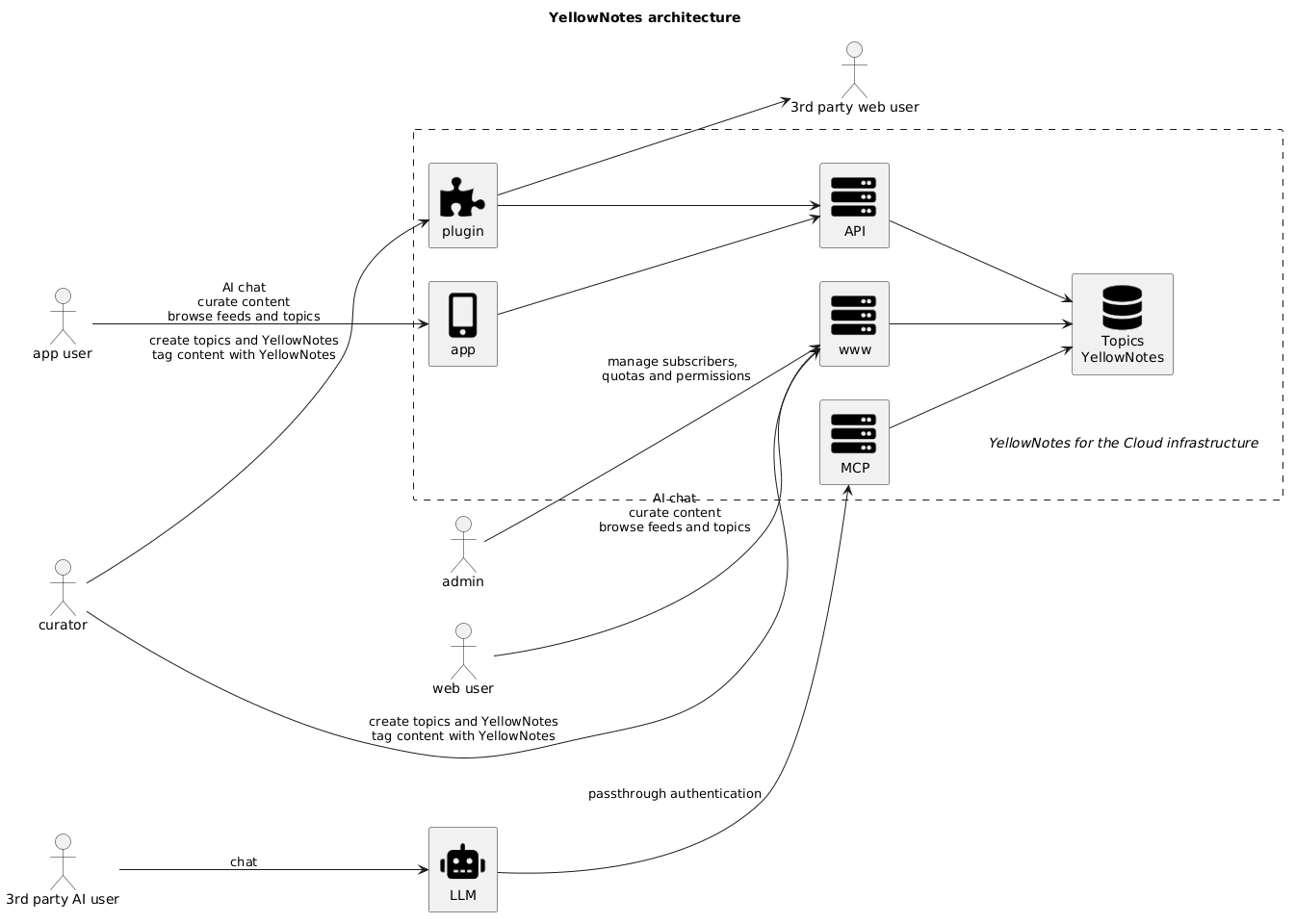
14. YellowNotes for the Cloud architecture
Highlevel view of our system, user and interaction architecture.
3rd party AI user
Most people know AI tough the chat interfaces of the major vendors such as Open AIs chatCPT or Anthropics Claude. Using the MCP, YellowNotes AI can be utlized from other AI platforms.
Curator
The Curator is person creatign YellowNotes that is the basis for the AI.
They execsice their judgement when selecting content for tagging with a yellownote.
Is is this judgment that drives the value of the YellowNotes AI.
Not merely gobbling up masses of random data and applying wast quantities of computation to derive something actionable, but selecting some few individual pieces of value and using them.
app user
3rd party web user
accessing website with a companion at your side
web application
The website has the complete complete functionality. YellowNOtes own AI chat is available here. The discovery tools are also here. This is where you locate others. Subject to people making them selvels available here you can discover what peple are interested in and, somewhat tounge-in-cheek, whether or not "they know what they are talking about"
most functionality found on the welbside till be migrated to the mobile apps. But mobile apps will have a slower release cycle.
AI agent employer
Using an AI agent makes you an employer of sorts.
MCP
Model Context Protocol, MCP, is the emerging communication standard through which AI chatbots and AI agents can be supplied with more information for better decisions. Q4/26 will see the launch of the YellowNotes MCP server with fine-grained access control.
plugin
Browser extensions are widely available for desktop-based browser and used more tham most people are really avare of. More than half of internet users under 30 years of age has installed a plugin in the form of an ad-blocker.
They are not used as much on mobile devices but availability is increasing
Yellownotes used to tag or capture web content, are most easily created using the YellowNotes plugin. But using the web site application or the mobile application, will get the job done just as well.
AI agent
AI Agents is the wave of the future in LLM-based AI technologies.
It is a technical space there the issue of control is at a premium.
We develope YellowNotes AI to address the problem of prompt engineering, where you had to know the answer to get the anser. This problem goes squared for AI Agents. Look to Q1/27 for this.